Celestial portrait preset

Cosmic Princess Halloween Portrait

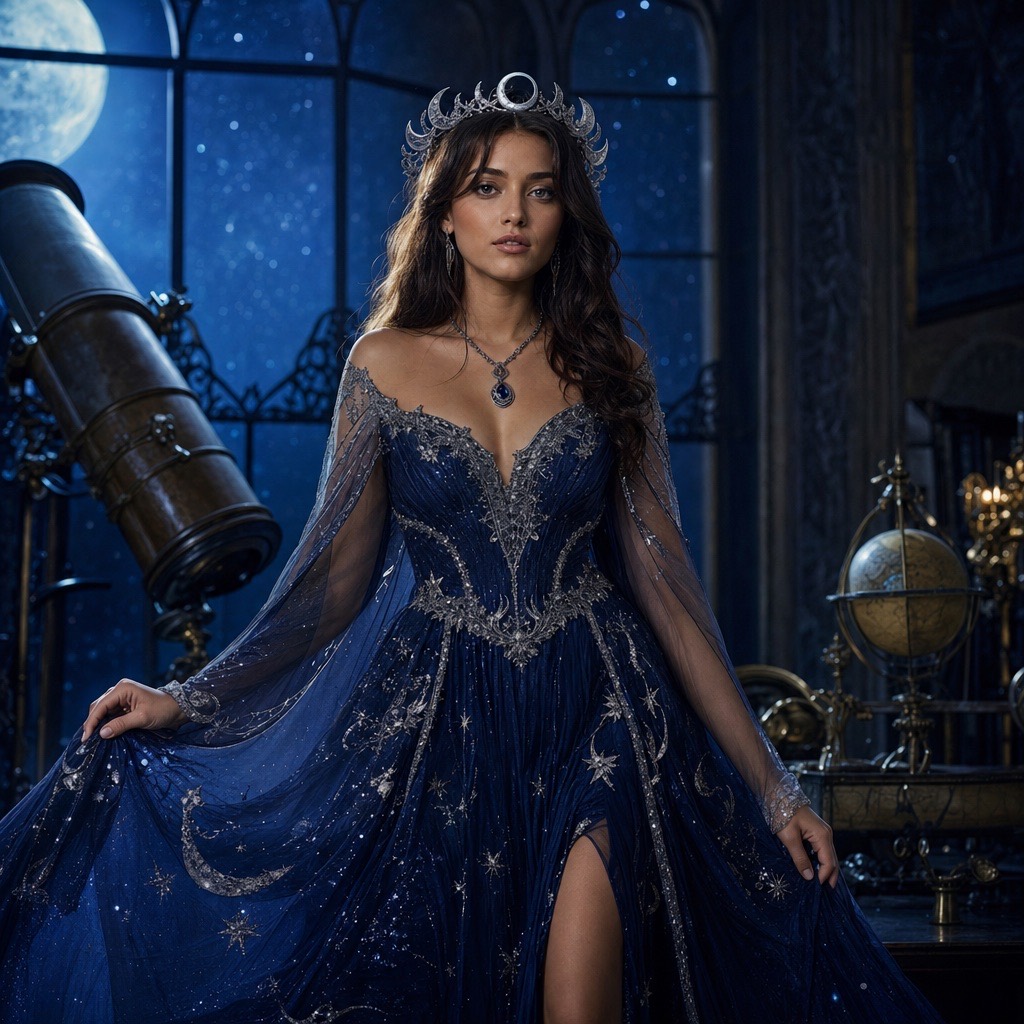
Cosmic Princess is a fantasy portrait look built around a midnight-blue gown, silver embroidery, softly glowing star patterns, and a moon crown. The setting is a moonlit observatory with tall windows and a visible star field.

It is a good fit for people who want a costume photo that reads as elegant rather than scary. The look works for profile photos, party invitations, and printed cards, and it keeps the face recognizable while changing the outfit and scene.

80 credits per image. Video costs more and is shown before you generate. No app install.

This seasonal guide is written in English. Interface labels follow your selected language.

AI-generated cosmic princess Halloween portrait with a midnight-blue gown and glowing stars

What changes

The outfit becomes a midnight-blue fantasy gown with silver embroidery, glowing star patterns, a moon crown, and luminous accessories.

What stays

Face, skin texture, body proportions, pose, and the number of people in the photo.

Best source photo

A waist-up photo with a clear face and a simple background; avoid photos where the arms cross the body awkwardly.

Prompt recipe

A polished fantasy portrait for profile photos, party invites, and Halloween moodboards.

This is the exact instruction the studio sends. Edit one sentence at a time so you can tell which change helped.

fantasyprincessstarryportrait
Edit the uploaded photo into an original celestial Halloween princess portrait. Preserve the subject's recognizable face, natural skin texture, body proportions, and pose. Replace the outfit with a midnight-blue fantasy gown featuring silver embroidery, softly glowing star patterns, and realistic flowing fabric. Add a delicate silver moon crown and luminous accessories. Place the subject inside a moonlit observatory with a starry sky visible through tall windows. Use elegant fantasy fashion photography, realistic fabric details, cinematic rim lighting, and a deep-blue, silver, and violet color palette. Keep the person recognizable. Avoid altered facial identity, extra people, distorted anatomy, text, and watermarks.

The model may simplify fine jewelry and embroidery at small output sizes.

Full-body poses can change the silhouette; waist-up photos preserve identity more reliably.

Glowing fabric looks stylized, not like a literal photograph of a real costume.

How to get a better result

Why the celestial look reads well in a small image

A deep-blue gown against a dark observatory creates a clean value contrast, so the silhouette stays readable even when the image is cropped to a small avatar. Silver embroidery and star patterns add detail without adding visual noise. The moon crown gives the eye a focal point above the face.

The palette is also forgiving. Blue, silver, and violet work together under both warm and cool lighting, which means the result holds up whether you print it, post it, or use it as a profile image.

How to get a clean fantasy result

Start with a photo where the shoulders and upper body are visible. The gown needs a body to drape around; a tight face crop gives the model too little information and often produces a floating collar. Keep the pose natural and avoid crossed arms, which are a common source of hand artifacts.

If the gown looks flat, ask for “visible fabric folds, silver thread detail, and a soft rim light.” If the stars look like stickers, ask for “subtle glowing embroidery, not printed graphics.” Precise material language produces a more photographic result.

Variations for different moods

For a darker look, change the observatory to a ruined planetarium and the palette to deep indigo and tarnished silver. For a warmer look, add “candlelight and brass instruments” to the scene. For a winter/holiday crossover, change the star field to falling snow without changing the gown.

Keep the identity constraint and the anatomy negatives in place for every variation. The creative words are meant to move; the protective words are not.

When to use the photo editor instead

If you already have a costume photo and only want a starry background, use the Halloween Photo Editor workflow instead of a full preset. A background-only edit costs the same 80 credits but preserves more of the original image.

Use Cosmic Princess when you want the gown, crown, and scene designed together. Use the editor when the costume is real and only the setting needs help.

Frequently asked questions

Can I generate a full-body Cosmic Princess image?

Yes, but a waist-up or three-quarter photo preserves identity more reliably. Full-body generations give the model more room to invent pose and proportions, which can change the silhouette.

Is this a Princess Rosalina costume?

No. Cosmic Princess is an original celestial gown concept with a midnight-blue dress, silver embroidery, and a moon crown. It is not the Super Mario character and is not affiliated with or endorsed by Nintendo or any official costume.

Is the gown a real product I can buy?

No. The gown is generated, not a real garment. The image is a costume concept, not a product photo or a sewing pattern.

How much does the Cosmic Princess image cost?

One image generation costs 80 credits. A video animation costs more; the exact amount is shown before you confirm.

Can I use this for a child’s costume photo?

Only with a parent or guardian present and with their permission. The workflow is a general image editor; it does not add age-appropriate safeguards on its own.

Can I change the color of the gown?

Yes. Replace “midnight-blue” with another color, but keep the silver embroidery and lighting instructions. Changing the palette and the setting at the same time makes it harder to judge which change caused a problem.

Last updated October 20, 2026. Prices and credit costs can change; the pricing page and the generator show the current amount before you confirm a generation.