Pet portrait preset

Pumpkin Pet Halloween Photo

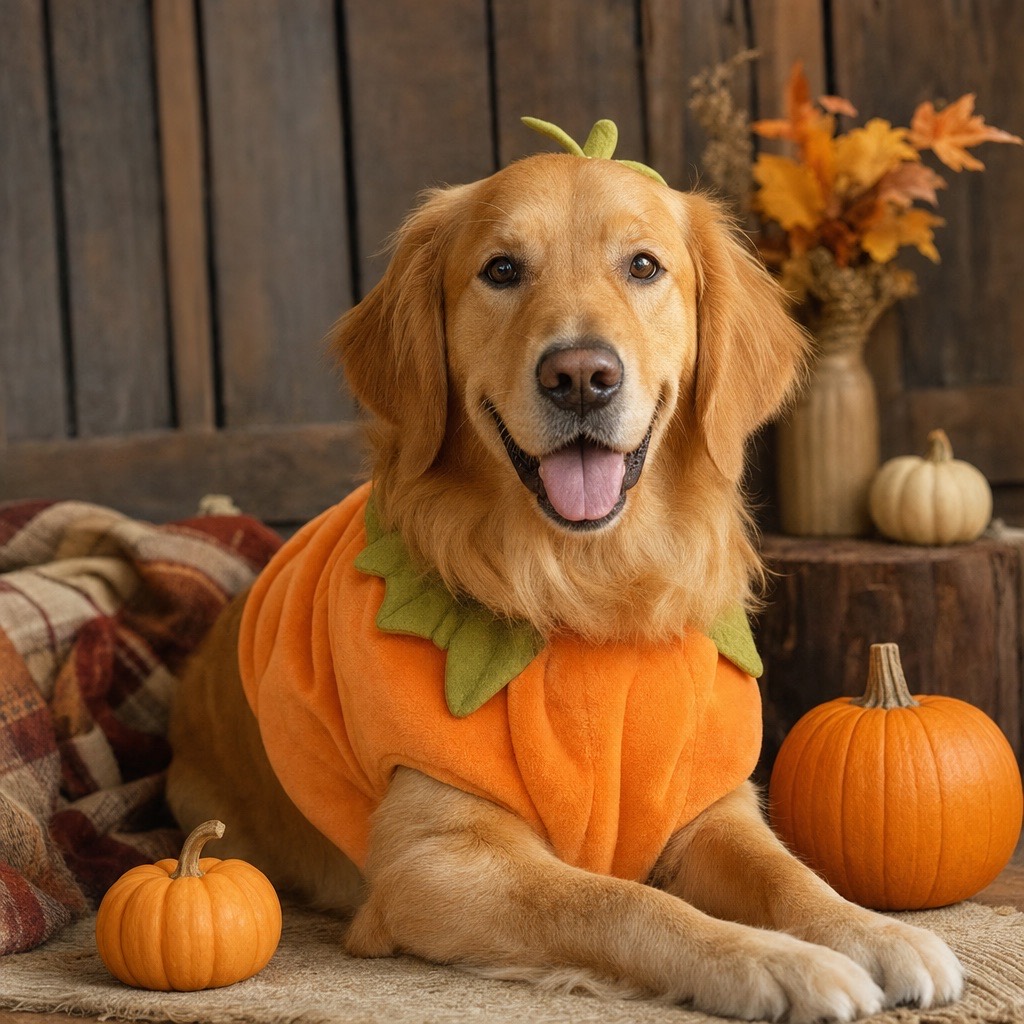
Pumpkin Pet dresses an animal in a soft pumpkin-inspired costume and places it in a warm autumn studio with miniature pumpkins. The prompt is written to preserve breed, fur color, distinctive markings, eye color, and natural anatomy.

Pet costumes are a different search intent from human costumes. People want a recognizable portrait of their own animal, not a generic cute pet. That is why the prompt spends more words on preserving the animal than on decorating the scene.

80 credits per image. Video costs more and is shown before you generate. No app install.

This seasonal guide is written in English. Interface labels follow your selected language.

AI-generated pet portrait in a soft pumpkin Halloween costume in an autumn studio

What changes

A soft pumpkin costume, a small green leaf accessory, warm studio lighting, and miniature pumpkins are added.

What stays

Breed, fur color, markings, eye color, facial appearance, and natural anatomy.

Best source photo

A clear, well-lit photo of one animal, ideally sitting or standing with the face visible.

Prompt recipe

A shareable pet portrait for Halloween cards, social posts, and family group chats.

This is the exact instruction the studio sends. Edit one sentence at a time so you can tell which change helped.

petpumpkinautumnportrait
Use the uploaded pet photo as the primary reference. Preserve the animal's original breed, fur color, distinctive markings, eye color, facial appearance, and natural anatomy. Dress the pet in a soft pumpkin-inspired Halloween costume with a small green leaf accessory. Keep the costume fitted naturally without covering the animal's eyes or changing its species. Place the pet in a cozy autumn photography studio with warm lighting and miniature pumpkins. Create a photorealistic professional pet portrait with realistic fur texture and natural shadows. Avoid extra animals, unnatural paws, duplicated limbs, text, and watermarks.

The costume is generated, not a real product you can buy.

Dark pets lose fur detail faster than light pets.

The model may straighten a curled pose to fit the costume.

How to get a better result

Why pet portraits need a different prompt

Human prompts can rely on the face to carry identity. Pet prompts cannot. A model that changes the ear shape, muzzle length, or fur markings produces an animal that no longer looks like the owner’s pet. The Pumpkin Pet prompt therefore names breed, fur color, markings, and eye color before it describes the costume.

The costume is also constrained: it must fit naturally and must not cover the eyes or change the species. That rules out full-face masks and oversized plush heads, which are common failure modes in pet costume generation.

How to photograph a pet for this preset

Use a photo at the animal’s eye level with soft, even light. Avoid flash directly into the eyes and avoid heavy motion blur. A sitting or standing pose gives the costume a body to fit; a close crop of the head gives the model too little information about the torso.

If the animal has a distinctive marking, make sure it is visible in the source photo. The model can preserve what it can see. A marking hidden by a blanket or a toy will not reliably appear in the result.

Other pet costume directions

The same structure works for a glow-in-the-dark dinosaur, a baked-potato costume, a butter-stick costume, or a tiny wizard robe. Replace the costume sentence, keep the preservation sentence and the anatomy negatives.

For a dark-furred pet, add “preserve fur detail in dark areas and avoid crushing blacks.” For a long-haired pet, add “keep the natural fur length and avoid a synthetic wig look.” These small additions fix the most common quality problems.

Publishing a pet photo

Ask permission before editing someone else’s pet. If the photo includes a person, crop them out or use a version where they are not identifiable. Do not imply that the generated costume is a real product for sale.

Pet photos are shareable, which makes them a good test of whether the workflow is working. If the breed and markings survive, the prompt is doing its job. If they do not, change the source photo before spending more credits.

Frequently asked questions

Will the generator keep my pet’s breed and markings?

The prompt explicitly preserves breed, fur color, distinctive markings, eye color, and facial appearance. Clear, well-lit photos with visible markings produce the strongest match.

Is this the Baked Potato or Glow Dinosaur pet costume?

No. Pumpkin Pet is an original pumpkin costume concept. The same structure works for a baked-potato, glow-dinosaur, or butter-stick costume, but the result is an AI-generated image, not a real product you can buy.

Can I use a photo with two pets?

The preset is written for one animal. Two pets increase the chance of merged bodies or duplicated limbs. Generate each pet separately and combine the results.

Does the pumpkin costume cover the pet’s eyes?

No. The prompt requires the costume to fit naturally without covering the eyes. If a result covers the face, regenerate or add “keep the eyes and muzzle fully visible” to the prompt.

How much does a pet portrait cost?

One image generation costs 80 credits, the same as a human costume portrait. Video animation is priced separately.

Can I generate a pet in a different costume?

Yes. Replace the pumpkin costume sentence with another costume, but keep the preservation and anatomy instructions. Change one part of the prompt at a time.

Last updated October 20, 2026. Prices and credit costs can change; the pricing page and the generator show the current amount before you confirm a generation.