Two-person preset

Cowboy & Angel Couple Halloween Photo

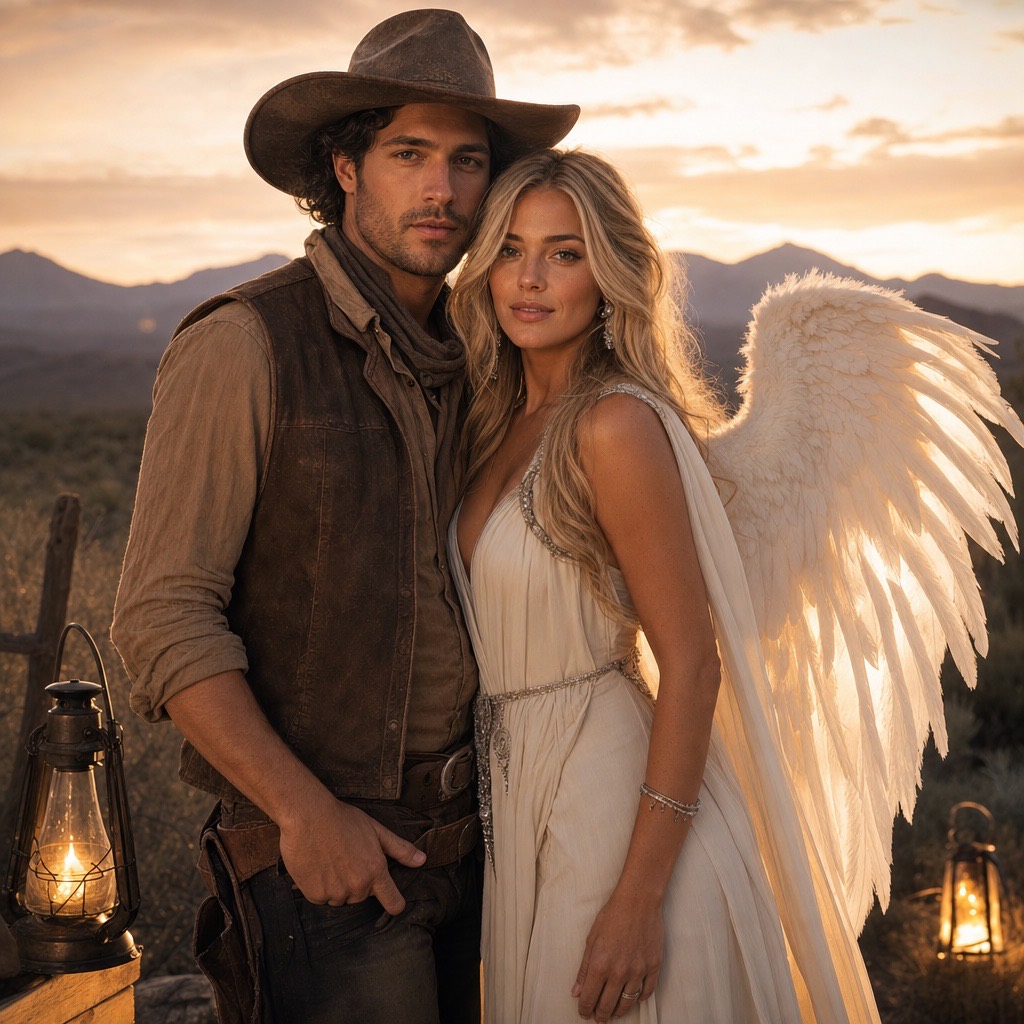
Cowboy & Angel is a two-person costume portrait. It takes two separate reference photos, dresses one person as a cinematic cowboy and the other as a luminous angel, and places them together in a warm desert dusk scene.

The hard problem in any couple generation is identity: models tend to swap faces, merge bodies, or add a third person. This preset addresses that directly by accepting two references and instructing the model to keep exactly two people, each with their own face.

80 credits per image. Video costs more and is shown before you generate. No app install.

This seasonal guide is written in English. Interface labels follow your selected language.

AI-generated couple Halloween portrait with a cowboy costume and an angel costume at dusk

Two references

Upload one clear photo per person. The prompt uses both as identity references instead of averaging two faces into one.

Coordinated contrast

Earth-tone western layers against an ivory angel outfit create two readable silhouettes in one frame.

Exactly two people

The prompt forbids a third person and merged bodies, which are the most common couple-photo failures.

Prompt recipe

A couple or friendship photo with one western look and one luminous angel look in the same frame.

This is the exact instruction the studio sends. Edit one sentence at a time so you can tell which change helped.

coupletwo peoplewesternangel
Use the two uploaded photos as references for two different people. Preserve each person's recognizable facial identity, skin tone, body proportions, and natural anatomy. Dress the first person as a cinematic cowboy with a weathered hat, suede vest, and warm earth-tone layers. Dress the second person as a luminous angel with soft feathered wings, an ivory outfit, and subtle silver details. Place them together in a warm desert dusk scene with soft haze and practical lantern light. Keep exactly two people, preserve each identity, and use photorealistic editorial photography. Avoid face swapping, a third person, merged bodies, extra limbs, distorted hands, text, and watermarks.

Use two clear, front-facing photos with similar lighting for the best identity match.

The model keeps exactly two people; group photos with pets need a separate preset.

Hands that touch or overlap are the most common place for artifacts.

How to get a better result

How to prepare the two photos

Use one front-facing photo per person, taken in similar lighting. If one photo is warm indoor light and the other is blue outdoor shade, the model has to reconcile two different skin tones, which makes identity matching harder. A pair of daylight photos is the safest starting point.

Crop each photo to the person, with the face and shoulders visible. Avoid photos where the two people are already together but one face is turned away. The model needs a clear view of each face to preserve it.

Why the cowboy-and-angel pairing works

The two costumes are visually opposite: dark, textured western layers next to a soft, bright angel silhouette. That contrast makes the composition readable at a glance, even in a small social preview. It also gives the model clear material cues: leather, suede, feathers, and silk.

The scene is deliberately warm and restrained: desert dusk, soft haze, and practical lantern light. A busy background would compete with the two costumes and make the couple harder to read.

What to do when a face changes

If one face is not preserved, check that the reference photo is sharp and front-facing. If both faces are preserved but the bodies merge, add “clear space between the two people, separate arms and hands” to the prompt. If a third person appears, repeat “exactly two people” and remove any group context from the source photos.

Change one variable at a time. Regenerating with the same prompt and same photos mostly changes random details, not the underlying identity match.

Other two-person combinations

The same structure works for a ghost-and-ghoul pair, a vampire-and-victim pair, or a sun-and-moon pair. Keep the “two references, exactly two people, preserve each identity” structure and replace only the costume and scene sentences.

For a group of three or more, generate each person separately and composite the images. A single generation with three faces is much more likely to swap or duplicate identities.

Frequently asked questions

How many photos do I need for Cowboy & Angel?

Two: one clear, front-facing photo per person. Similar lighting and a visible face in each photo give the best identity match.

Is this the Cowboys and Angels costume trend?

Yes, the pairing is inspired by the western-and-angel costume trend. The prompt, costumes, and scene are original; it does not copy a specific film, music video, or brand campaign.

Will the generator swap our faces?

The prompt asks the model to preserve each person’s identity and keep exactly two people. It reduces face swapping but cannot guarantee a perfect match. Clear, similar reference photos are the strongest defense.

Can I use this for a friendship photo instead of a couple?

Yes. The costumes are a suggestion, not a relationship requirement. The workflow only needs two people and two reference photos.

How much does a two-person portrait cost?

One image generation costs 80 credits, the same as a single-person portrait. Video animation is priced separately.

Can I add a pet to the couple photo?

Not reliably in one generation. Generate the couple first, generate the pet separately with Pumpkin Pet, and combine the images in an editor.

Last updated October 20, 2026. Prices and credit costs can change; the pricing page and the generator show the current amount before you confirm a generation.