Gothic portrait preset

Midnight Braids Halloween Look

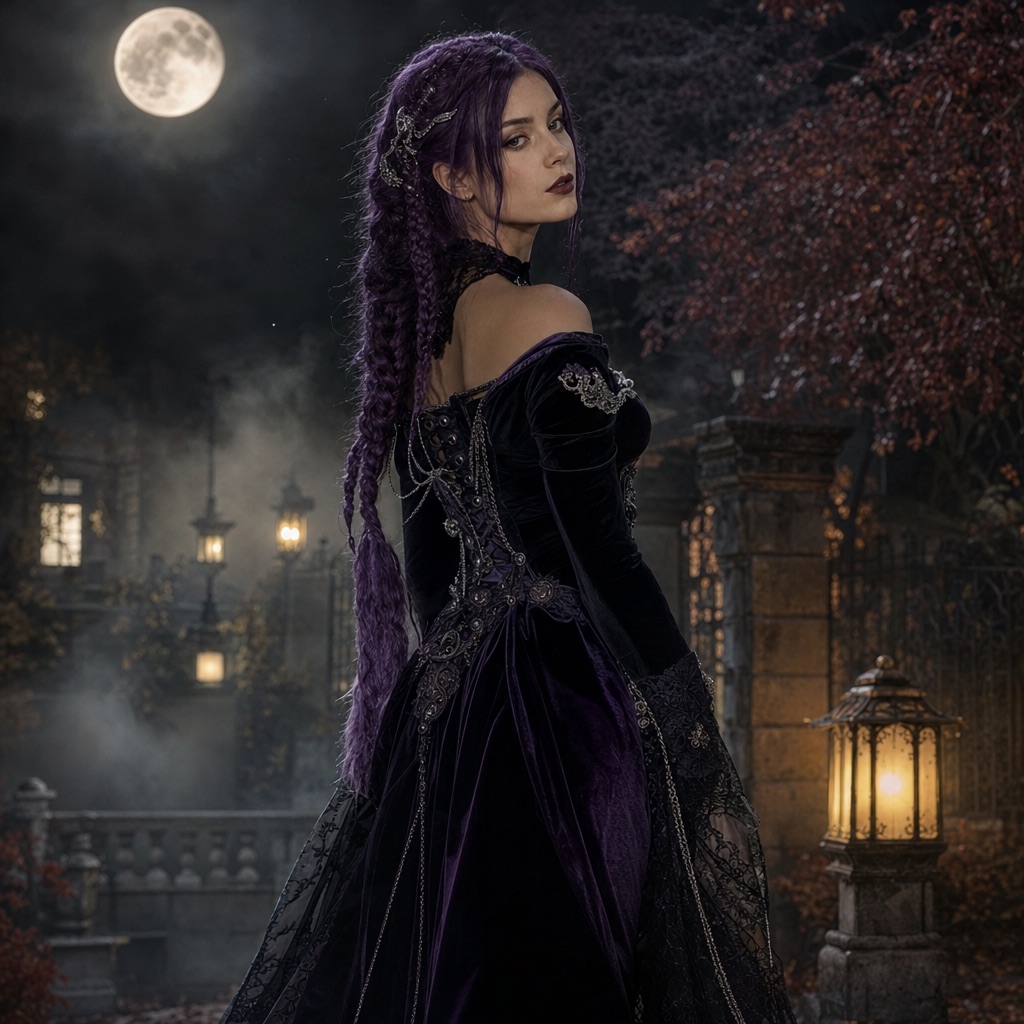
Midnight Braids is a gothic editorial look: long violet braids, a black-and-purple velvet outfit, silver hair accessories, and a moonlit Victorian garden. It is designed for a waist-up portrait where the face stays recognizable and the costume does the storytelling.

The look is original, but it sits close to the braided-character searches that rise every October. That makes it a practical choice when you want a trend-adjacent costume photo without copying a specific film or game character.

80 credits per image. Video costs more and is shown before you generate. No app install.

AI-generated gothic Halloween portrait with long violet braids in a moonlit garden

What changes

Hair becomes long violet braids with silver accessories; clothing becomes a black-and-purple velvet outfit with lace and metal details.

What stays

Face, skin tone, approximate age, body proportions, and the number of people in the photo.

Best source photo

A sharp, front-facing selfie or waist-up photo with even lighting and a simple background.

Prompt recipe

A photorealistic Halloween portrait that keeps the face recognizable while changing the hair, outfit, and setting.

This is the exact instruction the studio sends. Edit one sentence at a time so you can tell which change helped.

gothicbraidseditorialselfie
Use the uploaded photo as the primary reference. Preserve the person's recognizable facial identity, facial proportions, skin tone, approximate age, and natural anatomy. Transform the subject into an original gothic Halloween fashion portrait. Change the hairstyle into long violet braids decorated with delicate silver hair accessories. Replace the clothing with an elegant black-and-purple velvet outfit with subtle lace and metallic details. Place the subject in a moonlit Victorian garden with soft fog, glowing lanterns, and dark autumn foliage. Use photorealistic editorial photography, realistic fabric textures, natural skin details, and cinematic soft lighting. Keep the same number of people as the uploaded photo. Avoid altered facial identity, extra limbs, duplicated fingers, distorted anatomy, text, logos, and watermarks.

Very dark source photos can lose detail in the braids.

A face turned more than about 45 degrees from the camera may be reconstructed, not preserved exactly.

Heavy filters and beauty smoothing on the source photo are usually carried into the result.

How to get a better result

Why this look works

Braids create a strong vertical silhouette, which makes the costume readable even in a small profile image. The violet-and-black palette separates the subject from the moonlit garden background without turning the image into a cartoon. Silver accessories add a second focal point near the face, which helps the portrait feel intentional rather than like a filter.

The prompt also protects the parts that make the image believable: facial proportions, skin texture, fabric behavior, and anatomy. A costume portrait fails when the face changes or the hands multiply. The negative instructions are as important as the creative ones.

How to run the preset

Open the generator with the preset loaded. Upload one front-facing photo. Keep the default aspect ratio for a profile image, or switch to a taller ratio for a phone wallpaper. Generate once and inspect the face before changing anything else.

If the braids are too dark, ask for “soft moonlight rim lighting on the hair” rather than increasing overall brightness. If the velvet loses texture, ask for “visible velvet nap and realistic fabric folds.” Change one instruction at a time so you can tell which change helped.

Photo mistakes that weaken the result

A face turned away from the camera forces the model to reconstruct rather than preserve. A photo with strong colored lighting pushes the palette into the costume, so the velvet may turn blue or green. A very low-resolution photo loses the silver accessory detail that makes the look distinctive.

Group photos are also a poor fit. The prompt keeps the same number of people as the upload, so a photo with three friends will try to dress three people and is much more likely to produce artifacts. Crop to one person before uploading.

Variations worth testing

Change the garden to a candlelit hallway for a more claustrophobic horror mood. Change the velvet to deep emerald for a poison-ivy direction. Change the braids to silver-white for a ghostly look. Keep the identity and anatomy constraints unchanged.

If you want motion, generate the still first and then open the Animate This Look preset. A slow head turn and drifting fog are enough; fast dance moves tend to distort braids and hands.

Frequently asked questions

Does Midnight Braids keep my face?

The prompt instructs the model to preserve recognizable facial identity, proportions, skin tone, and age. A sharp, front-facing photo gives the strongest match. Extreme angles and heavy filters reduce accuracy.

Is this a Lily Love Braids costume?

No. Midnight Braids is an original gothic braided look inspired by the broad braided-character trend. It is not the Poppy Playtime character and is not affiliated with or endorsed by the game or its costume license.

How many credits does this look cost?

One image generation costs 80 credits. Animating the result as a video costs more; the exact amount is shown before you confirm.

Can I use a photo with two people?

It is not recommended. Midnight Braids is written for one person. For two people, use the Cowboy & Angel preset, which accepts two separate reference photos and keeps exactly two identities.

Can I change the braid color?

Yes. Replace “violet braids” with the color you want, but keep the rest of the prompt intact. Change one variable at a time so you can compare results.

Is this a specific film character?

No. Midnight Braids is an original gothic look inspired by braided-character trends. It is not affiliated with or endorsed by any film, game, or costume brand.

Last updated October 20, 2026. Prices and credit costs can change; the pricing page and the generator show the current amount before you confirm a generation.