Sci-fi costume preset

Halloween Robot Costume

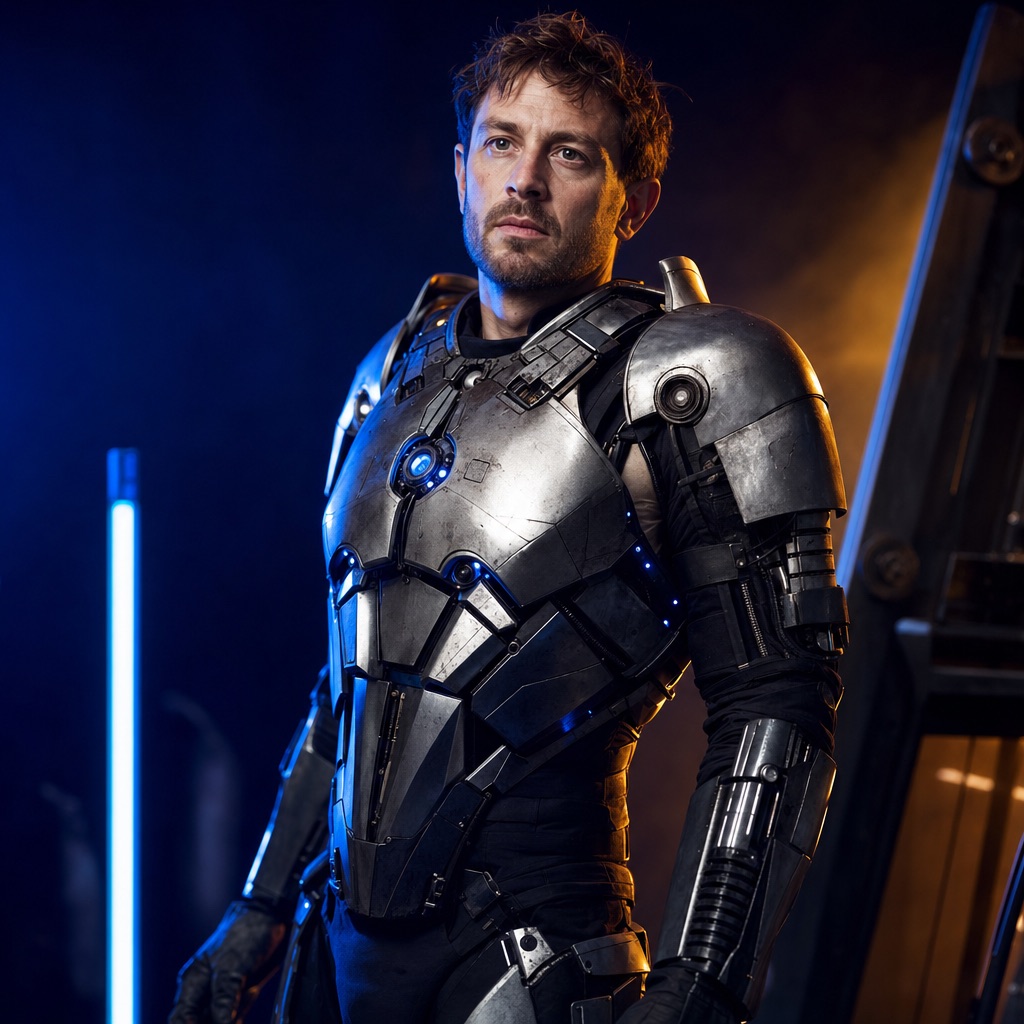
Halloween Robot is a wearable-costume look: metallic armor panels, subtle blue LED accents, articulated shoulder pieces, and a cinematic blue-and-orange studio light. The important constraint is that the costume looks like something a person could actually wear, and the face stays human.

That makes it different from a full CGI robot transformation. The result should read as a costume photo, not as a new mechanical character. It is a good fit for sci-fi fans, group costumes, and anyone who wants a stronger silhouette than a fabric outfit provides.

80 credits per image. Video costs more and is shown before you generate. No app install.

AI-generated Halloween robot costume portrait with metallic panels and blue LED accents

What changes

Armor panels, LED accents, shoulder pieces, and studio lighting are added around the person.

What stays

The human face, skin tone, head proportions, pose, and body shape.

Best source photo

A photo with visible shoulders and a relaxed pose; a slight turn gives the armor panels more depth.

Prompt recipe

A cinematic costume portrait that reads as a person in a costume, not a replacement robot character.

This is the exact instruction the studio sends. Edit one sentence at a time so you can tell which change helped.

robotsci-ficostumestudio
Using the uploaded photo as reference, transform the subject into a futuristic Halloween robot costume portrait. Preserve the subject's recognizable face, skin tone, head proportions, and original pose. Create a realistic wearable robot costume featuring metallic-looking armor panels, subtle blue LED accents, and articulated shoulder pieces. The outfit should look like a believable costume worn by a real person, not a completely new mechanical character. Use dramatic blue-and-orange cinematic studio lighting and realistic material reflections. Do not replace the subject's face with a robot head. Avoid extra limbs, distorted hands, duplicated body parts, logos, and text.

The face stays human by design; requests for a full robot head are out of scope.

Thin glasses frames and loose hair can merge with helmet edges.

Blue LED accents are decorative and may not be physically plausible in every pose.

How to get a better result

Why the face stays human

A full robot head is easy to generate and hard to make convincing. It also removes the person from the photo, which defeats the point of a costume portrait. This preset explicitly says not to replace the face with a robot head. The costume frames the face instead of hiding it.

The second constraint is believability. The armor should look wearable: panels that follow the shoulders, seams that suggest assembly, and LEDs that sit on the surface rather than floating. That is why the prompt asks for a costume worn by a real person, not a new mechanical character.

Photo and pose tips

A slight turn or a three-quarter view gives the armor panels more depth than a perfectly flat front-facing photo. Keep the arms away from the body so the shoulder pieces have room. Avoid heavy patterned clothing, which can bleed into the metal texture.

If the armor looks like plastic, ask for “brushed metal, visible seams, and realistic specular highlights.” If the LEDs look like glowing stickers, ask for “small recessed blue LEDs with a soft practical glow.” Material language is more effective than adding more adjectives.

Group and couple variations

For a group costume, generate each person separately with the same prompt and a similar background, then combine the images. A single generation with multiple faces is more likely to swap identities or add an extra person.

For a couple, one robot and one human handler is a strong contrast, but generate the two people separately and composite them. The dedicated Cowboy & Angel preset is the better choice when you need two identities in one generated frame.

Where the look works best

The blue-and-orange lighting is designed for a dark studio or a night scene. It works well for a profile photo, a party poster, or a short video. It is less suitable for a bright outdoor daytime photo, where the LEDs and metal reflections compete with sunlight.

If you want a daylight version, change the lighting instruction to “overcast daylight with soft shadows” and keep the costume description intact. The result will look more like a cosplay photo and less like a movie still.

Frequently asked questions

Will the generator replace my face with a robot head?

No. The prompt explicitly preserves the human face and instructs the model not to replace it with a robot head. The costume is built around the person.

Is this the AI robot costume trend?

Yes, it is designed for the AI robot costume trend, but it is an original wearable-costume concept. It does not copy a licensed film, game, or brand robot, and the face stays human on purpose.

Does the robot costume look real or CGI?

The prompt aims for a believable wearable costume with metal panels, seams, and practical LEDs. It is still an AI-generated image, so fine details may not be physically consistent.

How many credits does a robot costume image cost?

One image generation costs 80 credits. A video animation costs more; the exact amount is shown before you confirm.

Can I generate two robots in one image?

It is possible but less reliable. Generate each person separately with the same prompt and combine the results, or use the Cowboy & Angel preset if you need two identities preserved in one frame.

Can I use a photo with glasses?

Yes, but thin frames can merge with the helmet edge. If the glasses disappear or warp, upload a photo without them or ask the model to preserve the glasses explicitly.

Last updated October 20, 2026. Prices and credit costs can change; the pricing page and the generator show the current amount before you confirm a generation.